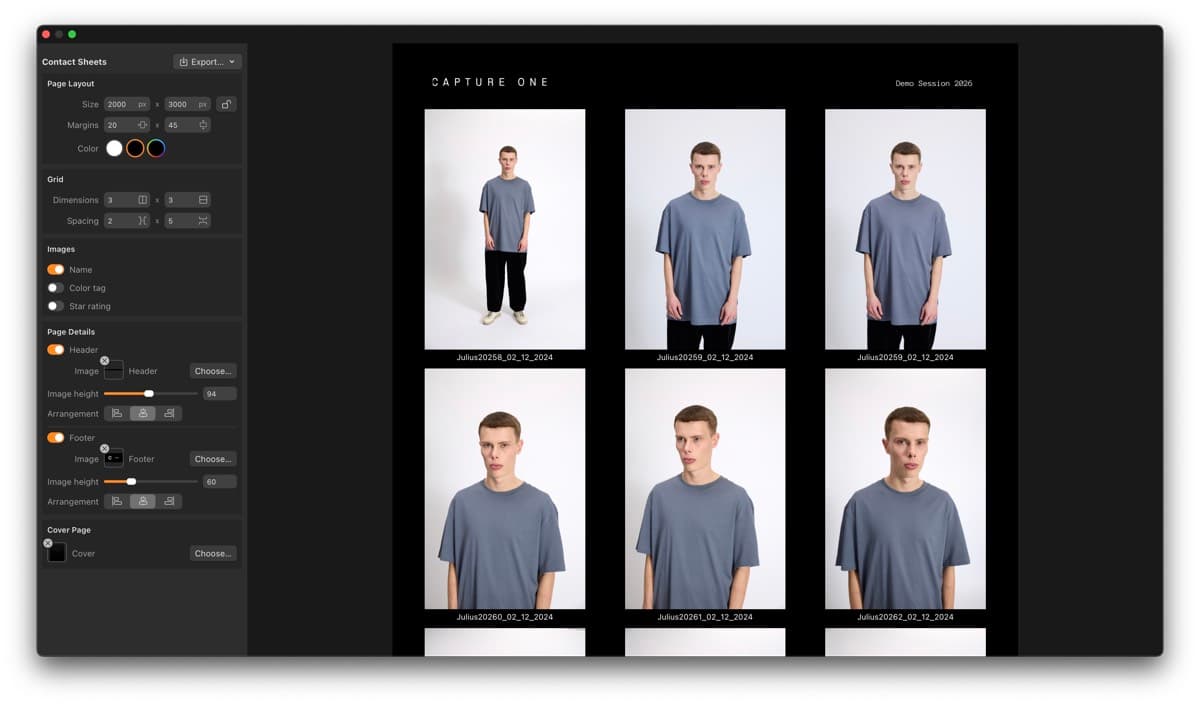
Capture One is a popular raw processor for studio and tethered work. In version 16.7.0, they added a Contact Sheets tool that builds grid layouts of your images for proofs, catalogs, or reference sheets without leaving the app.
Below is the full workflow, plus one thing that bugged me about it.
How to make contact sheets in Capture One
Step 1: Select your images
In the browser, select the images you want on your contact sheet. The selection order determines the order on the final sheet, so click through deliberately. For contact sheets, sequence usually matters.
Step 2: Open the contact sheets dialog
Go to File > Export to Contact Sheet, or right-click your selection and pick Export to Contact Sheet from the context menu.

Step 3: Configure the layout
The dialog lets you set grid dimensions, margins, and spacing. Default resolution is 2,000 x 3,000 pixels, but you can go anywhere from 600 to 10,000 pixels per dimension. Low-res JPEG for a quick Slack message, high-res PDF for a printed lookbook.
You can also change the background color to match your branding.

Step 4: Add metadata and branding
Toggle Show Name to display filenames beneath each thumbnail. Since version 16.7.3, you can also add headers and footers with custom images (your logo, project title), a cover page, and ratings or color tags below each thumbnail so clients see your initial selects.
These settings persist between sessions, so you won't need to re-add them for every new sheet.
Step 5: Export
Pick PDF or JPEG, choose a destination folder and filename, and export. Since 16.7.4, PDF exports produce smaller files for easier sharing.
What works well
If you already live in Capture One for tethering and color grading, having contact sheets in the same app saves you a trip to Photoshop or Lightroom. The branding options (cover page, headers, footers) are a nice touch that most competing tools don't have.
The catch
The Contact Sheets tool is desktop-only. If you're on location, reviewing images on your phone between setups, or trying to send a quick proof from the back of a cab, you can't use it. You need your workstation, your catalog loaded, your images imported.
For studio photographers who shoot tethered, that's fine. For wedding photographers, street shooters, and photojournalists who need to send selects quickly, it doesn't help much.
It also requires a Capture One Pro license ($299/year). If all you need is a contact sheet, that's a lot to pay.
Or just use your phone
Contact Sheet for iPhone and iPad does the same thing without any of that. Pick photos from your camera roll, choose a layout, export. Done.
I use it when I'm reviewing film scans on the train or need to text a client some selects before I've even packed up. Way faster than waiting to get back to my desk.
Download Contact Sheet on the App Store